 Creating Your Character
 First Time Playing?
- If this is your first character, we highly recommend selecting "Wake up from a Dream" and following the Welcome New Players tutorial walkthrough.
- Tutorial Benefits: The tutorial introduces you to Mom, game mechanics, and helps you choose your first class.
- After creation and the tutorial, use the Adventure Guide to pick level-appropriate monsters, quests, dungeons, equipment goals, and travel routes.
- Skip Tutorial: You can skip the tutorial, but you'll miss valuable guidance and early game items.
 Step 1: Logging In
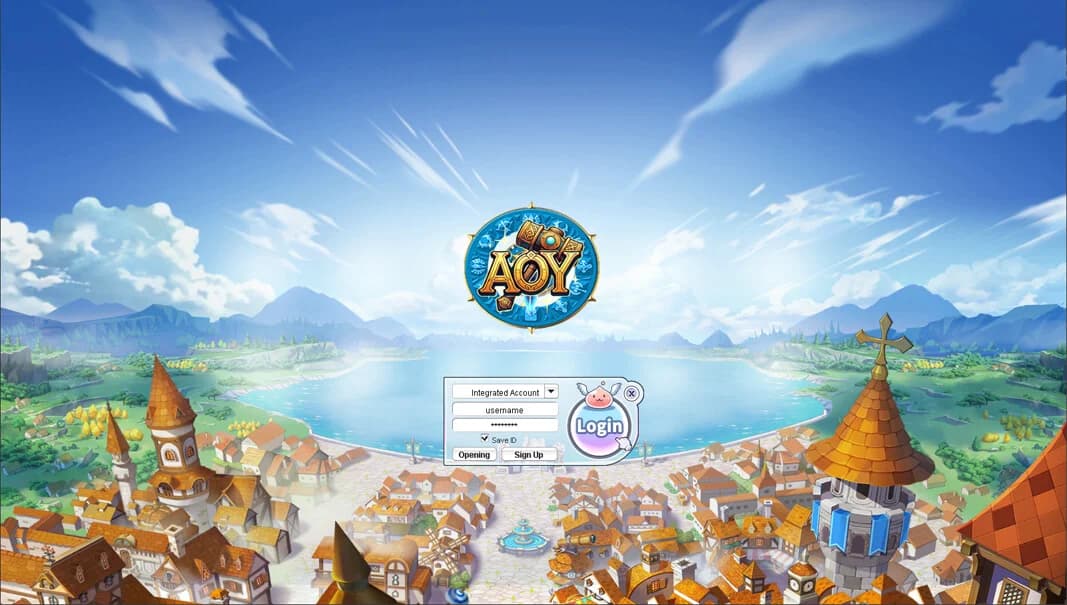
First, launch the game client and log in with your account credentials. The login screen will prompt you for your username and password.
 Starting Options

Character Progression Options
When you click Play after logging into the game, you'll be presented with character progression options:
| Option | Description | Recommended For |
|---|---|---|
| Wake up from a Dream | Start with the tutorial | New players (Recommended) |
| Skip Tutorial | Start directly in the game world without the tutorial | Experienced players |
We recommend new players choose "Wake up from a Dream" to experience Mom's tutorial, which provides:
- - Introduction to game mechanics
- - Early equipment and items
- - Class selection guidance
- - Familiarization with important NPCs
 Character Customization
 Step 2: Character Creation Window
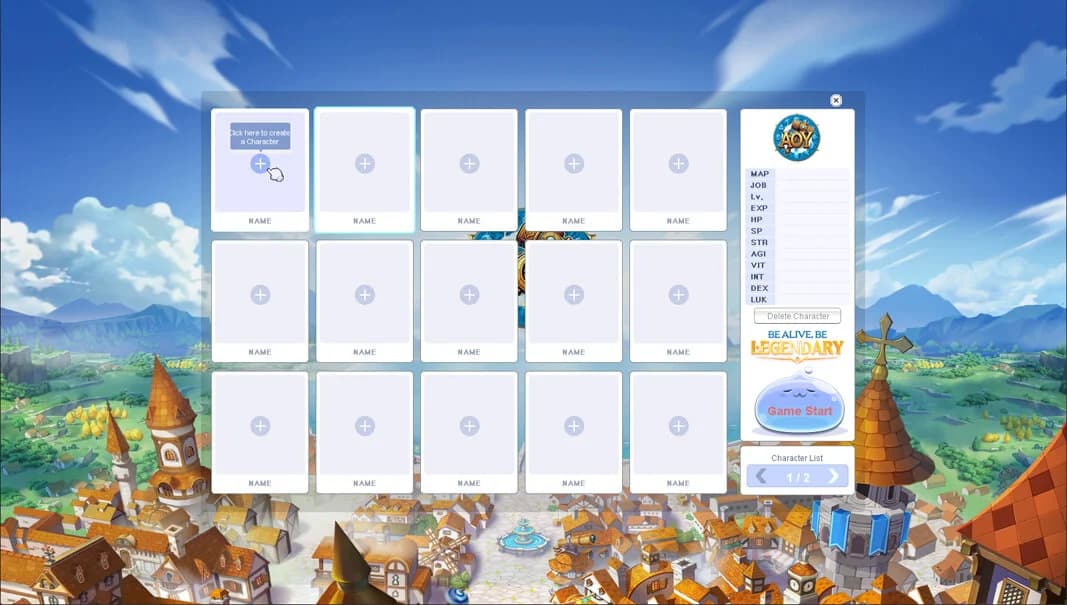
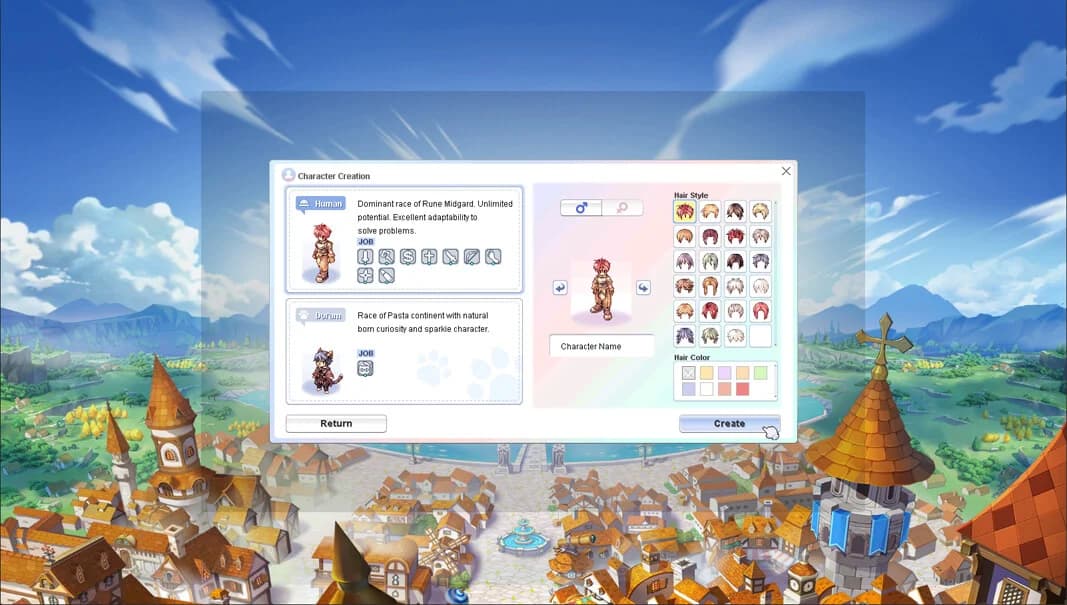
Click on an empty slot to open the character creation window. Here you can customize your character's appearance and choose your starting options.
Step 3: Empty Character Slots
If you're creating a new character, click on an empty character slot. The character selection screen shows available slots where you can create new characters.
Step 4: Character Selection Screen
After logging in, you'll see the character selection screen. If you have existing characters, they will be displayed in the character slots. If this is your first character, you'll see empty slots ready for character creation.
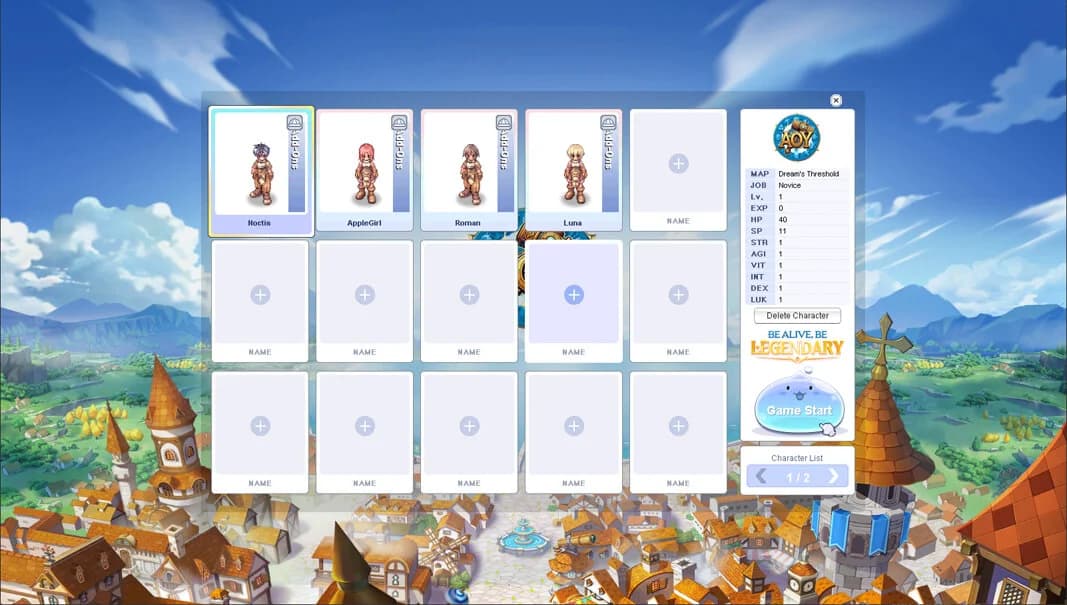
 Basic Information

Character Customization Options
During character creation, you'll need to provide the following information:
| Option | Description | Notes |
|---|---|---|
| Race Selection | Choose between Human or Doram | Human: unlimited class potential Doram: Summoner class only |
| Character Name | Choose a unique name for your character | Subject to server naming rules |
| Gender | Select your character's gender | Affects appearance and some class options |
| Hair Style & Color | Customize your character's appearance | 24 hairstyles and 12 hair colors available |
| Starting Location | Where your character begins | Determined by your tutorial choice |
 Character Slots
Each account has multiple character slots available. You can create multiple characters to:
- Try different classes and playstyles
- Have characters for different purposes (farming, PvP, support, etc.)
- Experience different aspects of the game
 Starting as a Novice
All characters begin as a Novice at level 1, regardless of your starting choice. As a Novice, you'll learn the basics of the game before advancing to your chosen class.
 Novice Basics
| Aspect | Details |
|---|---|
| Starting Level | Level 1 |
| Starting Stats | Base stats that you can distribute |
| Starting Equipment | Basic Novice equipment |
| Class Advancement | Available after completing the tutorial or reaching certain requirements |
Class Selection Guide- Class Selection: During Mom's tutorial, you'll have the opportunity to try different class training weapons before making your final decision.
- Note: You can try all available classes during the tutorial - your choice isn't final until you confirm with the Job Master.
- Important: Once you advance to your first class with the Job Master, you cannot change back to Novice, so choose carefully!
 Tutorial Path: Wake up from a Dream
If you selected "Wake up from a Dream", you'll begin in Mom's house and follow these key steps:
| Step | Action | Description |
|---|---|---|
| 1 | Character Creation | After clicking Play, select Wake up from a Dream to start the tutorial. |
| 2 | Meet Mom | You'll wake up in Mom's house and begin learning the basics of movement and interaction. |
| 3 | Gather Equipment | Collect your starting equipment from the treasure chest and closet. |
| 4 | Learn Combat | Practice combat mechanics in the basement. |
| 5 | Choose Your Class | Select a training weapon from the Weapon's Manual to try different classes. |
| 6 | Confirm Your Choice | Return to Mom and confirm your class selection. |
| 7 | Meet Shorty | Encounter Shorty (the AoY Guide) who will assist you up to level 71. |
| 8 | Job Change | Visit the Job Master in the Main Office to officially advance to your chosen class. |
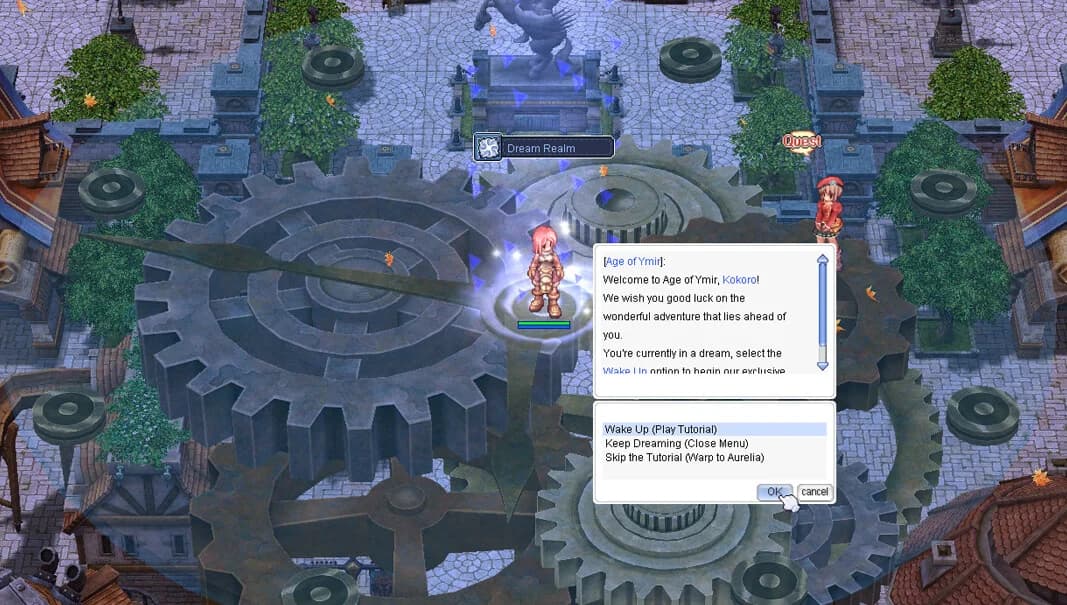
 For detailed information about each step of the tutorial, visit the Welcome New Players guide.
 Skipping the Tutorial
What You'll Miss
If you choose to skip the tutorial, you'll start directly in the game world. However, you'll miss:
- Mom's guidance and introduction to game mechanics
- Early equipment and items from the tutorial
- The opportunity to try different classes before committing
- Introduction to Shorty (AoY Guide)
Recommendation: Even experienced players may benefit from completing the tutorial at least once to understand Age of Ymir's custom systems and features.
 Class Selection
 Available Classes

Class Selection
Age of Ymir offers a wide variety of classes to choose from. During the tutorial, you can try training weapons for different classes:
| Class | Description | Playstyle |
|---|---|---|
| Swordman | Melee fighter specializing in swords and shields | Close combat, tank |
| Mage | Magic user with powerful spells | Ranged, magic DPS |
| Archer | Ranged combat specialist | Ranged, physical DPS |
| Acolyte | Support class with healing abilities | Support, healer |
| Merchant | Economic specialist with crafting abilities | Support, crafting |
| Thief | Stealth and agility-based combat | Close combat, DPS |
| And many more... | Additional classes available | Various playstyles |
 Class Advancement System
Age of Ymir Custom Changes
Age of Ymir features custom class advancement mechanics that differ from standard Ragnarok Online:
| Feature | Age of Ymir | Standard RO |
|---|---|---|
| Rebirth System | No rebirth system - you won't transcend into High Novice at level 99 | Rebirth available at level 99 |
| Upper Second Classes | Job change directly into Upper Second Classes at level 80 | Requires rebirth first |
| Expanded Classes | Taekwon, Super Novice, Gunslinger, Ninja are treated as Primary Classes | Special classes with different requirements |
For more information about classes and their progression paths, visit the Classes Guide.
Character Naming Rules

Naming Guidelines
When creating your character, keep these naming rules in mind:
| Rule | Description |
|---|---|
| Uniqueness | Character names must be unique on the server |
| Appropriateness | Names must follow server rules and community guidelines |
| Length | Character names have length restrictions |
| Characters | Some special characters may not be allowed |
Tip: Have a few name options ready in case your first choice is already taken!
Next Steps After Creation
| Step | Action | Description |
|---|---|---|
| 1 | Complete the Tutorial | If you chose "Wake up from a Dream", follow Mom's guidance through the Welcome New Players tutorial |
| 2 | Meet Shorty | Your guide NPC who provides buffs and information up to level 71 |
| 3 | Visit the Job Master | Advance to your chosen class in the Main Office |
| 4 | Open the Adventure Guide | Use the Adventure Guide to decide what to hunt, quest, run, equip, or travel to next |
| 5 | Join the Eden Group | Access quests and rewards for new players |
| 6 | Explore the World | Begin your adventure in Age of Ymir! |
Recommended Reading
- Welcome New Players - Detailed tutorial walkthrough
- Adventure Guide - Find what to hunt, quest, run, equip, or travel to after creation
- Your First Hour - What to do after character creation
- Classes Guide - Learn about all available classes
- Next Steps - Continue your journey
Tips & Tricks
For New Players
- Take Your Time: Don't rush through character creation - your choices matter!
- Try Multiple Classes: Use the tutorial to test different class training weapons
- Read Tooltips: Pay attention to class descriptions and skill information
- Ask Questions: The community is helpful - don't hesitate to ask in Discord
For Experienced Players
- Custom Systems: Even if you're familiar with RO, Age of Ymir has custom changes worth exploring
- No Rebirth: Remember there's no rebirth system - plan your build accordingly
- Upper Second Classes: You can advance directly to Upper Second Classes at level 80
- Tutorial Rewards: Consider doing the tutorial for the early items and Enchant Tome
Troubleshooting
Common Issues
| Issue | Solutions |
|---|---|
| Character name already taken? |
|
| Can't see character creation screen? |
|
| Tutorial not starting? |
|
Getting Help
If you encounter issues during character creation:
- Visit our Troubleshooting Page
- Check the F.A.Q for common questions
- Join our Discord Server (opens in a new tab) for community support
- Open a Support Ticket (opens in a new tab) on Discord