 Downloading the Game
 Download Note
If you haven't created an account yet, please register here first. Download Requirements: You must be logged into your account on our website to download the game client. Download Page: Visit the downloads page after logging in to access the game client files.
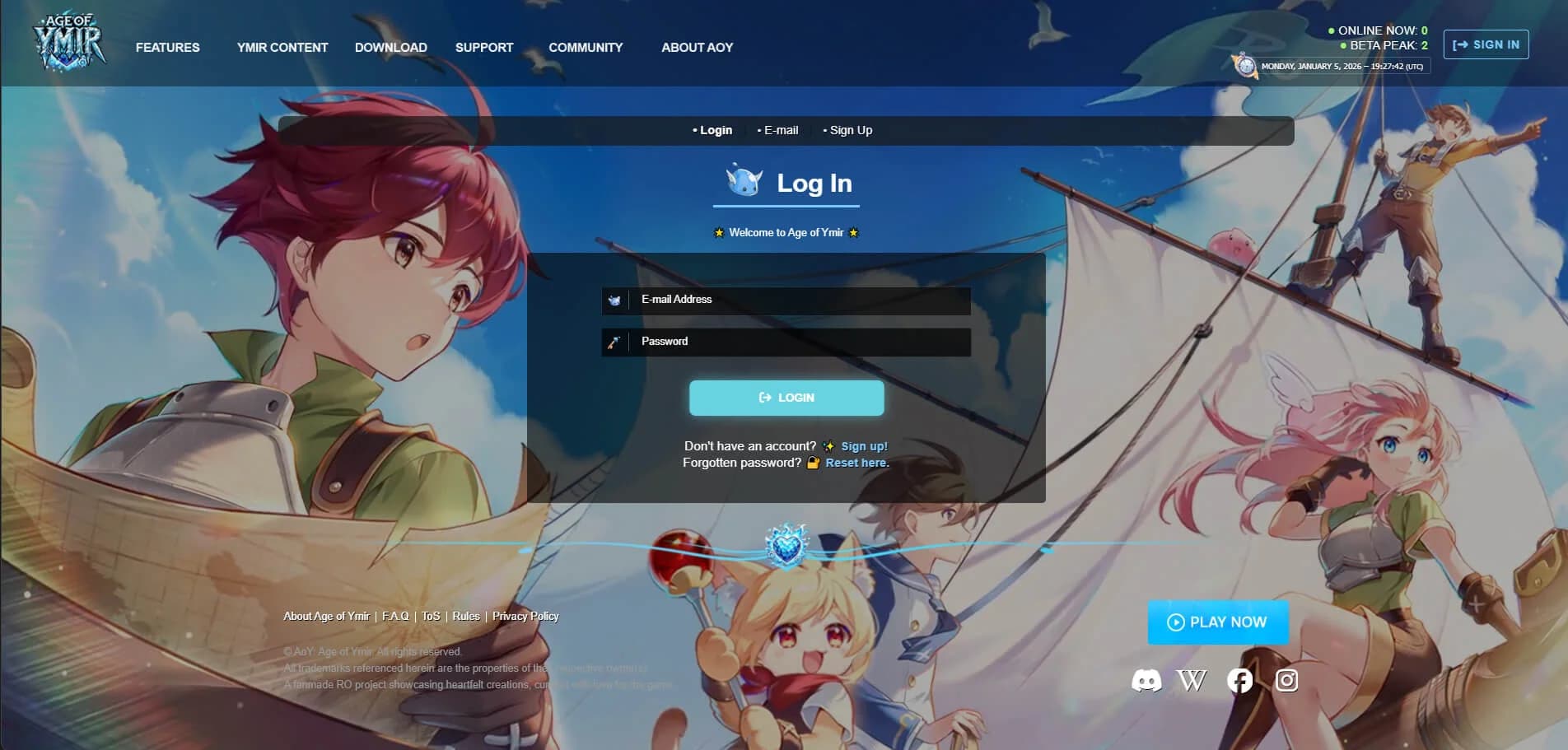
Step 1: Log into your account on the Age of Ymir website to access the downloads page.

Step 2: Navigate to the downloads page to select your preferred client (Full Client recommended).
 Available Downloads
| Client Type | Size | Description |
|---|---|---|
| Full Client | 6.2 GB | Complete client ready to update and play (recommended) |
| Lite Client | 3.1 GB | Compact client that needs to be set up over a clean & up-to-date kRO folder |
| Optional Resources | Varies | Additional files for manual patching, HD display setup, and other enhancements |
 Installation Steps
Quick Installation Guide
Follow these three simple steps to get Age of Ymir up and running. New to AoY? Our game docs cover accounts, patching, first login, and early progression.
| Step | Action | Details |
|---|---|---|
| 1 | Download Game Client | Download either the Full Client (recommended) or Lite Client from the downloads page. Then use 7-Zip or WinRAR to extract the files. |
| 2 | Add to Antivirus Exceptions | Add both |
| 3 | Run the Launcher | Run |
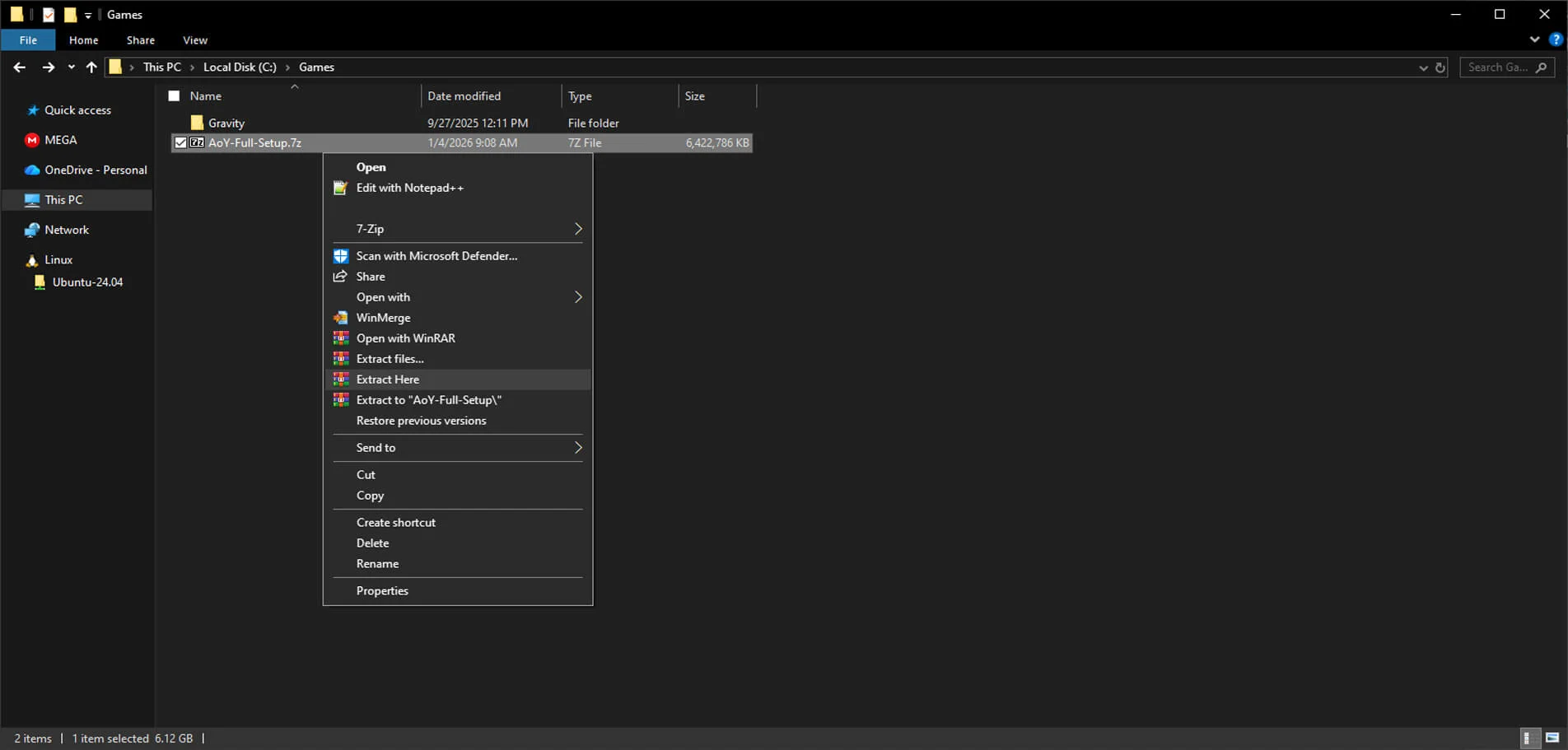
Step 1 (Continued): Right-click the downloaded .7z file and select "Extract Here" to extract the game files to your desired location.

Step 2: In Windows Security, navigate to "Virus & threat protection" -> "Exclusions" -> "Add an exclusion" -> "Folder", then select your "Age of Ymir" game folder.

Step 3: Launch AoY Launcher.exe to patch the game. Once the patch process is complete, click "START GAME" to begin your adventure!
 Security Note
Always whitelist both Age of Ymir.exe as well as the AoY Launcher.exe in your antivirus software. This ensures smooth patching and prevents unexpected blocking or illegal software warnings.
Optional: If Windows Defender flags these files, for peace of mind you can also submit them to Microsoft Malware Analysis and / or your desired Antivirus company for review to help improve detections along with reputation of the game client.
 Optimize Latency
Cloudflare 1.1.1.1 App
Struggling with lag or unstable internet while playing Age of Ymir? We highly recommend using the 1.1.1.1 App by Cloudflare - a free tool that improves your connection by reducing latency, packet loss, and optimizing DNS routing.
| Benefit | Description |
|---|---|
| Enhanced Privacy & Security | Protects your connection with encrypted DNS queries |
| Faster Connection | Reduces latency and packet loss for smoother gameplay |
| Cross-Platform | Available for Windows, Mac, Android, and iOS |
 HD Display Setup
dgVoodoo Configuration
For players with HD, 4K, or 8K displays, follow these steps to configure dgVoodoo for optimal resolution and UI scaling.
| Step | Action | Details |
|---|---|---|
| 1 | Download dgVoodoo | Download the setup package: dgVoodoo (2.79.3) from the wiki. Extract the contents into your |
| 2 | Copy Required Files | From MS folder:
From 3Dfx/x86 folder:
Also place: dgVoodooCpl.exe and dgVoodoo.conf |
| 3 | Configure dgVoodoo | Launch
|
| 4 | Fix Small UI on 4K Screens | Right-click
|
 That's it! You're now ready to enjoy AoY in high-resolution glory without UI bugs or stretching issues.
 Special Characters
Language Support
Some languages include special characters (e.g., Korean, Russian, Japanese, Chinese). The client cannot natively display them. To enable their display, follow the steps below.
| Step | Action | Details |
|---|---|---|
| 1 | Download Setup | Download the package: Special Characters Setup (dinput.dll & dinput.ini). Place |
| 2 | Configure CodePage | Open |
| 3 | Launch the Game | Launch the game as usual. |
| Language | CodePage | Notes |
|---|---|---|
| Japanese | 51932 | EUC-JP encoding |
| Korean | 51949 | EUC-KR encoding |
| Chinese | 51950 or 51936 | EUC-CN or GB2312 encoding |
| Russian | 1251 | Cyrillic (Windows-1251) |
| All Languages (UTF-8) | 65001 | Universal Unicode support |
 Gray World Setup
Performance Optimization
For improved performance, you can use the Gray World textures which replace all map-related textures with gray versions, reducing GPU load.
| Step | Action | Details |
|---|---|---|
| 1 | Download Gray World Textures | Download the Gray World Textures (GRF) resource. |
| 2 | Install Files | Paste the contained files within into the Age of Ymir directory (game folder). |
| 3 | Enjoy Increased Performance | Log into the game and enjoy increased performance! (All map-related textures will appear gray.) |
 AzzyAI (Homunculi)
Enhanced Homunculus AI
AzzyAI is an enhanced AI system for Homunculi that provides better automation and behavior for your homunculus companion.
| Step | Action | Details |
|---|---|---|
| 1 | Download AzzyAI | Download the AzzyAI (Homunculi) resource. |
| 2 | Install Files | Paste the contained files within into the Age of Ymir directory (game folder). |
| 3 | Activate in Game | Log into the game and use the command |
 PC Requirements
Minimum Requirements
| Component | Specification |
|---|---|
| OS | Windows XP |
| CPU | Intel Celeron 2.4Ghz / AMD Athlon 3000+ |
| Memory | 512MB |
| Graphics | NVIDIA / ATI VRAM64MB or higher |
| Network | ADSL 256Kbps |
| DirectX | DirectX 8.0 or higher |
Recommended Requirements
| Component | Specification |
|---|---|
| OS | Windows 10 or higher |
| CPU | Intel Pentium4 3.0Ghz / AMD Athlon64 3700+ |
| Memory | 1GB and above |
| Graphics | NVIDIA / ATI VRAM128MB or higher |
| Network | ADSL 1Mbps up |
| DirectX | DirectX 9.0 or higher (recommended 9.0c) |
 Additional Resources
Optional Downloads
Additional Resources
The following resources are available on the downloads page:
| Resource | Description |
|---|---|
| AoY Launcher | Game launcher for patching and updates |
| AoY Data GRF | Additional game data files |
| SystemEN Folder | System files for English localization |
| Gray World Map | Performance optimization textures |
Getting Help
Support Resources
If you encounter any issues during installation, use these resources for assistance:
| Resource | Description |
|---|---|
| Troubleshooting Page | Visit our troubleshooting guide for common installation issues |
| F.A.Q | Check the F.A.Q for common questions and answers |
| Discord Server | Join our Discord Server for community support |
| Support Ticket | Open a Support Ticket on Discord for direct assistance |